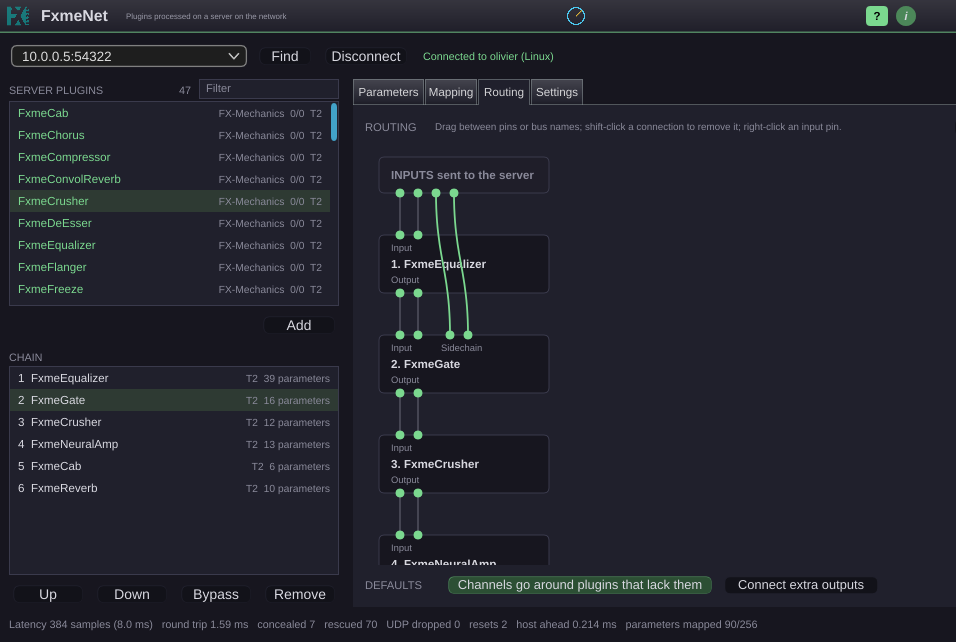
By default the chain is serial, like the inserts of a mixer channel: the output of each plugin feeds the next one, and the last one feeds the DAW. The Routing tab turns the chain into a patchbay, so that you can run plugins in parallel, feed a sidechain from the DAW or from another plugin, or send the outputs of a multi-output plugin to different channels.
From top to bottom, the tab shows:
A connection runs from an output pin to an input pin that is below it. Connections cannot go back up, so there is no feedback loop.
An output can feed several inputs (each gets a copy). Several outputs on one input are summed, as in a DAW; this is how parallel paths are mixed back together.
A bypassed plugin keeps its pins and passes each input channel to the output channel with the same number.
Until you change anything, each input of a plugin is fed by the nearest plugin above it that has a matching output channel (the Inputs count as the top box). This reproduces the behaviour of an ordinary serial chain:
Two options under DEFAULTS change the default rule. They never affect connections you made by hand.
On by default. Off: each plugin is fed only by the one right above it, so channels that no plugin processes are silent.
Off by default. On: the extra outputs of a plugin continue its main ones, so a plugin with two main and two extra outputs feeds four channels below it.
You can add, remove and move plugins after you have wired the chain. Connections you did not touch follow the default rule in the new chain. For the ones you made by hand:
A sidechain input only becomes active when you connect something to it: connect a DAW channel (an input) to the plugin’s sidechain bus to compress a bass with a kick, for example. The server then enables that bus, which prepares that plugin again; expect a brief gap on that plugin only. Unconnected auxiliary buses stay disabled, because many plugins behave differently with an enabled bus that carries silence.
The channels the plugin sends to the server are the ones its connections need. Channels you do not connect are not sent, which saves network bandwidth.
When two paths of different latency meet at an input, FxmeNet delays the shorter path so that they stay aligned. A parallel compressor, for example, keeps its dry and wet signals in phase even when the processed path goes through a linear-phase equaliser. The latency the DAW is told is the one of the longest path from the inputs to the outputs.